Introduction
Welcome to GWC’s Python Library Documentation!
This software is in a very early stage of development, and is regularly being iterated upon and improved. Please note that this library should not be considered to be in a stable state. Should you notice any bugs it is greatly appreciated if you can open an issue in our github!
What is GWC?
GWC GmbH is a Zurich-based software company specializing in custom data and AI solutions for finance and life sciences. Known for Swiss quality and an open-source mindset, GWC combines innovation with a client-first approach.
What does this library do?
This library serves as the backbone for our TimeSeries and DataTable management system. It is meant to orchestrate and organize the interaction between live incomming data from markets, exchanges, providers and data brokers, and the end user (technicians, researchers, analysts, engineers, traders, quants, etc…)
Machine Learning algorithms, benefit from low-latency, high-throughput data feeds. We have developed this package for the purposes of logically maintaining:
Data Sources
Time Series
Data Tables
Private Keys
Underlyings & Assets
There are two ways to use this library. Using ursa’s backend infrastructure, or deploying infrastructure on your own cluster in a containerized environment.
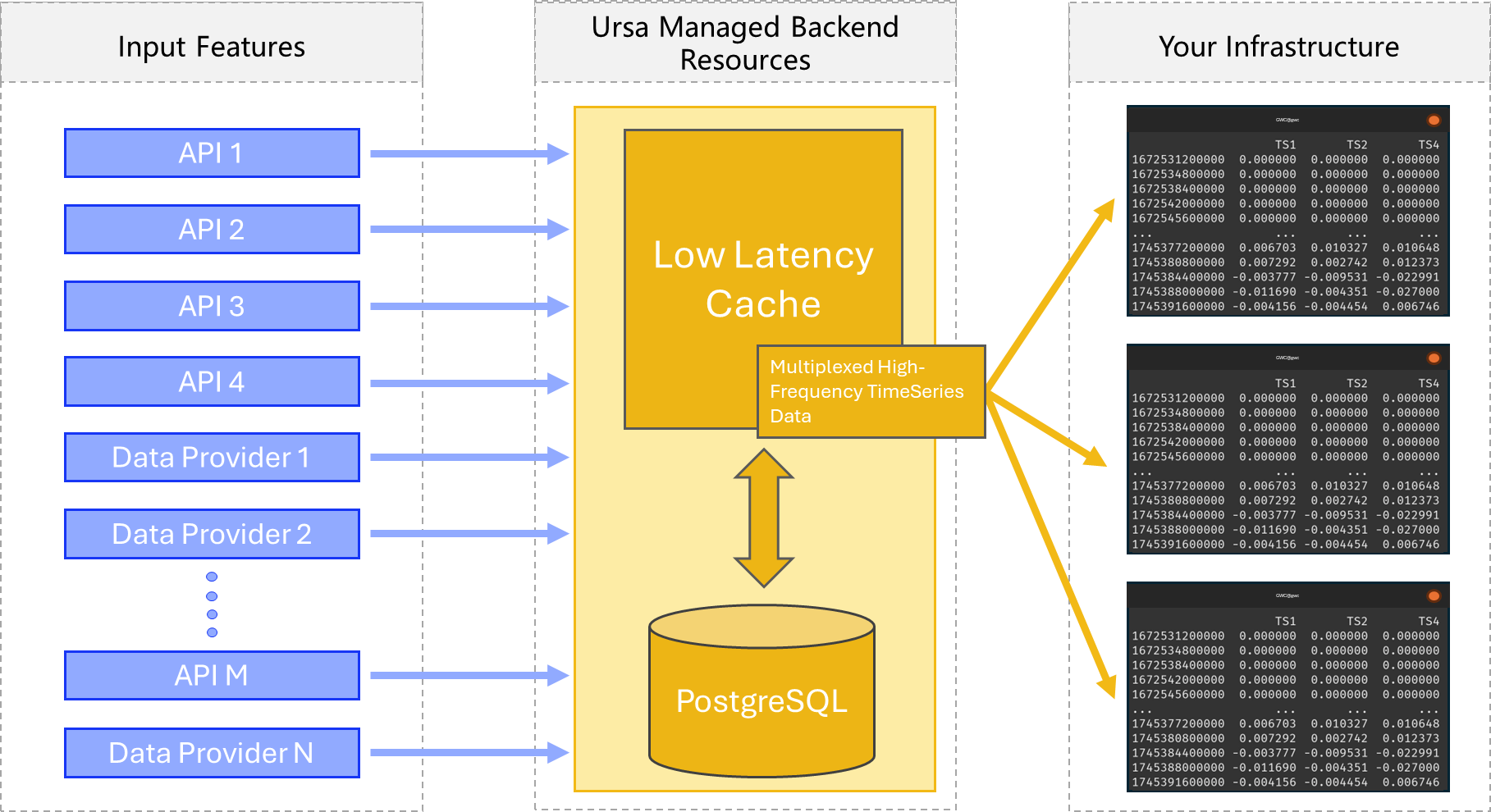
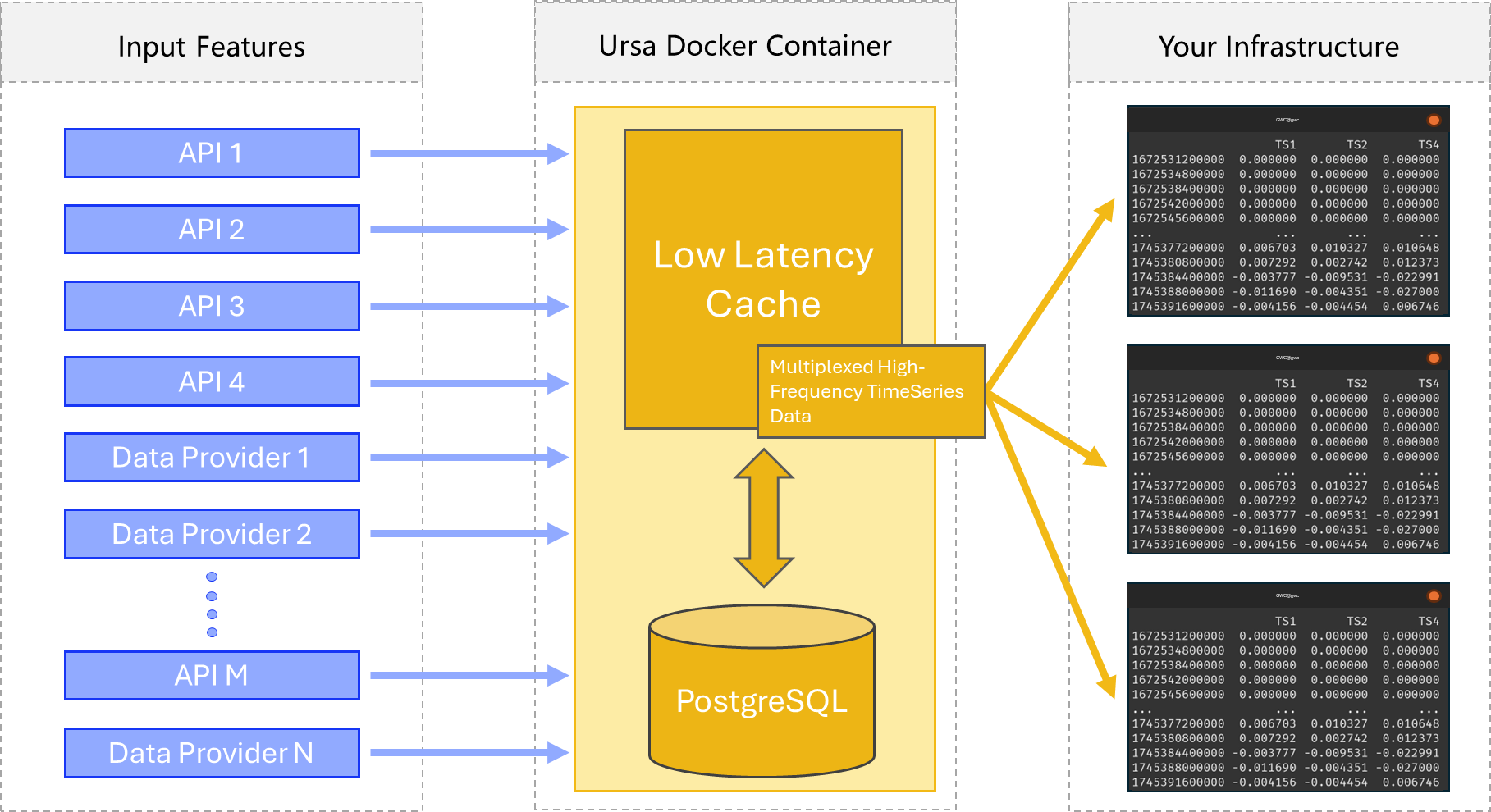
Two rough (over-simplified) schematics of the data orchestration which is facilitated by this library can be visualized below.
First, service mode, where you are using ursas’s backend infrastructure:
And Second, container mode, wherein you deploy all the infrastructure yourself, in a container on your own system (still under development):
This library is designed to massively accelerate machine learning algorithms by providing logically organized, live access to a variety of data feeds, including a structured interface for engineering new features.
Motivation
Despite how much you may have paid, your timeseries database is simply slower than an in-memory data management system. This is due to several compounding factors:
Data which is already living in RAM is accessed quicker than memory which must be dredged from the disk.
Data which must be written to a timeseries database is inaccessable during the moments it is being written, and it is simply faster to write information to RAM than to disk – barring some exceptional cases.
Incomming data streams which are only tasked with depositing data into memory, require lower overhead to run, and are therefore operable in greater numbers per unit compute than stream handlers which must write all information to disk.
How it Works
ursa manages your timeseries objects intelligently, organizing incomming data streams in-memory, and storing them only later to disk in seperate asynchronous processes.
ursa provides you with a simple interface for defining so-called DataTables, which live directly in memory, may be maintained live, and accessed from anywhere.
ursa additionally provides an interface for designing new features, as functions of existing ones. Simply by defining a new feature, data is automatically computed and spooled for maintenance in any in-memory DataTable which contains it.
Notation
Throughout these docs, we will refer to various objects and entity classes. We will use the following shorthand for various entity class instances:
# DT always refers to an instance of the DataTable class.
DT: ursa.backend.DataTable

# TS always refers to an instance of the TimeSeries class.
TS: ursa.backend.TimeSeries

# U always refers to an instance of the Underlying class.
U: ursa.backend.Underlying

# PK always refers to an instance of the PrivateKey class.
PK: ursa.backend.PrivateKey

# S always refers to an instance of the Source class.
S: ursa.backend.Source
A capital “S” is added to the end of entity class instance names when they’re contained in a list, often when they’re being assigned from methods which return a list.
For instance:
from ursa_sync.backend import TimeSeries
from ursa_sync import session

# TSS is a list containing TimeSeries objects
# therefore it has the standard entity class name of TS, plus "S" (TSS) .
TSS: List[TimeSeries] = TimeSeries.load_all(db)

db.close()